
Built for online research. Trusted by professionals.
Handle surveys of any complexity
Today’s professionals require advanced, flexible survey solutions capable of addressing intricate scenarios, dynamic workflows, and sophisticated data management needs. IdSurvey is specifically designed for organizations that demand more, offering complex branching logic, powerful integration capabilities, customizable configurations, and robust performance. The platform can be used in the cloud or deployed on-premise, giving organizations the freedom to choose the setup that best fits their IT strategy and compliance requirements. Our support team is also equipped to develop custom integrations with existing enterprise systems, such as CRMs, ERPs, and internal platforms, ensuring seamless data flow and perfectly tailored operations to match your organization’s processes.
Dynamic survey design with full logical control
From simple flows to advanced logic, your survey, your rules.
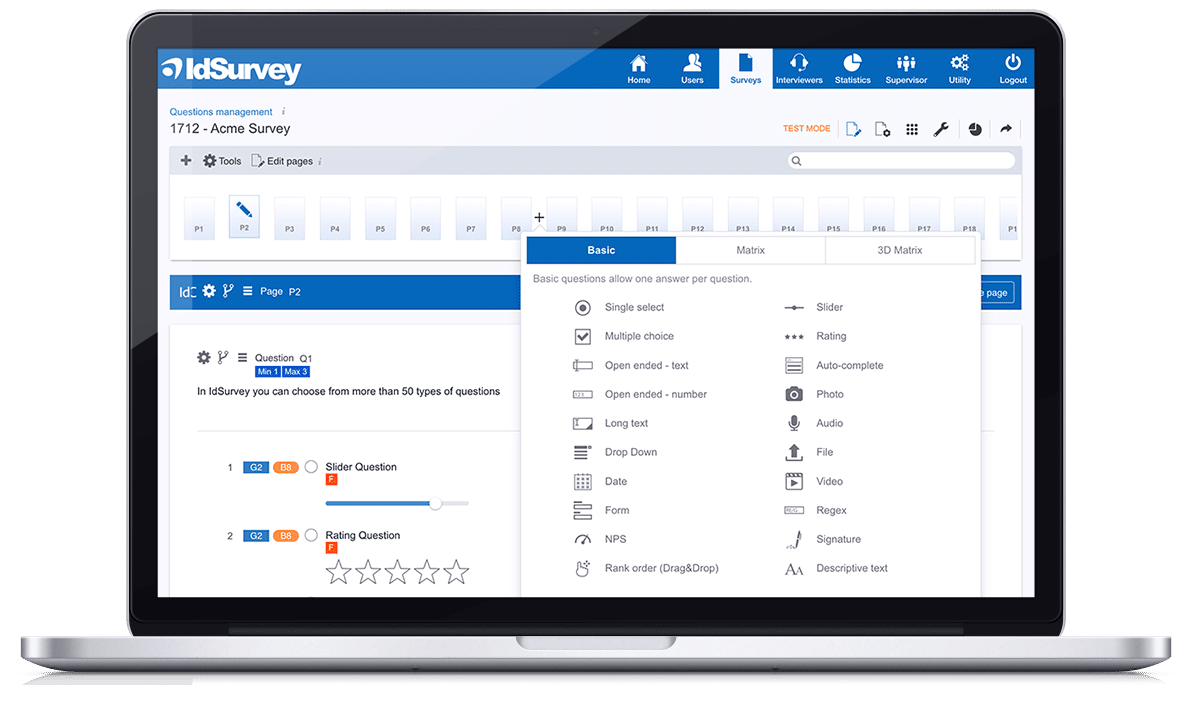
Design questionnaires of any complexity thanks to a powerful combination of advanced question types and flexible logic tools. Create dynamic, fully personalized survey experiences using display conditions, skip logic, and custom rules that adapt in real time to each respondent’s input. With IdSurvey, you can choose the approach that best fits your workflow, whether building filters and conditions through intuitive visual editors or writing custom logic directly in code for maximum control and precision. This unmatched flexibility allows you to handle even the most intricate survey structures with ease and confidence.
Advanced reporting & AI-Powered insights
From real-time data to automatic analysis, turn responses into action.
IdSurvey includes powerful tools designed to make data analysis both intuitive and effective.
Build fully customized, visually engaging reports with ease perfect for internal use or sharing securely with clients and colleagues to encourage collaboration.
Thanks to automatic descriptive analysis and AI-generated insights, you can now instantly identify significant trends, patterns, and relationships in your data. The system analyzes responses in real time, providing a detailed and immediate overview of emerging behaviors and preferences, helping you focus on what matters most and make data-driven decisions with confidence.

Automatic report
IdSurvey generates automatic reports based on your survey question types, allowing you to customize and finalize comprehensive reports with maximum time efficiency
Breakout
Drill down into your data with powerful Breakout tools. Easily segment survey results by variables such as demographics, responses, or custom criteria to uncover trends and differences between groups.
Sharing results
Easily share real time survey reports with clients, colleagues, or stakeholders. With IdSurvey, you can generate live, read-only links to reports, ensuring secure access to up-to-date.
Export results
You can export the entire report in PDF or PowerPoint format. You can also export individual charts in PDF, PPT, PNG or aggregated data in Excel format to create custom reports with external tools.
Request demo
Fill in the form to schedule a demo of IdSurvey.
IdSurvey is the survey software professionals love.
Thanks to its advanced survey tools it’s easy to design even the most complex questionnaires.
Schedule a free live demo with our team today.
























Tools for online survey distribution
Send the invitation to answer the questionnaire by email, sms, links and third party systems
Email sender
Designing a email campaign has never been easier
IdSurvey’s integrated Email Sender allows you to manage survey campaigns quickly and efficiently. You can launch a campaign to your entire contact list or define specific criteria to target selected recipients. The system handles customizable reminders, automatically sending follow-ups only to those who haven’t completed the questionnaire. You can also create multiple campaigns within the same survey to tailor messages for different segments of your contact list, ensuring more relevant and effective communication.

Smart email campaigns
Smart Campaigns automatically send invitation and reminder emails to contacts with the highest likelihood of helping you complete your survey quotas. The system checks progress up to every hour and continuously adjusts targeting based on completed interviews to optimize delivery and improve quota fulfillment.
Customized email address
On request, the sender’s email address can be fully customized to reflect your brand identity. This small but impactful detail helps reinforce brand recognition, build trust with respondents, and increase open rates right from the very first contact. A branded sender address also contributes to a more professional and consistent communication strategy across all your survey campaigns.
Reminder
For each campaign, you can schedule up to four reminders. Reminders are sent only to participants who haven’t yet completed the survey. Each reminder message can be customized to match your communication style, ensuring consistency and relevance across your outreach. Monitor detailed stats for every reminder to keep performance under control.

SMS sender
Reach everyone on their mobile devices, instantly
With IdSurvey’s SMS Sender, you can easily create and manage online survey invitations. Schedule reminders, track real-time stats, and monitor performance. Like the Email Sender, it supports Smart Campaigns that automatically optimize quota completion.
Set the sender with a phone number or brand name. A character counter helps manage message length and costs. Survey links are shortened for clarity and space-saving. The system also manages unsubscribe requests, ensuring compliance and keeping your contact list current.

Link on website, social media, and panels
Publish and track multiple links
Create customized links to track the origin of survey responses. You can generate multiple links for each distribution channel, for example, one for your website, one for social media, and another for email campaigns. Each link can be named individually, allowing you to accurately trace the source of every response collected.
Populate fields from URL
IdSurvey allows you to collect contact data directly from the URL. This means you can pass information such as name, email, or custom fields through the URL when you set up and publish the survey link in third-party systems or social platforms. IdSurvey will automatically populate the corresponding contact fields, streamlining the data collection process and enabling the use of this data in questionnaire logic.
Generic and unique survey links
IdSurvey supports both generic and unique survey links. Generic links are great for anonymous responses or integration with other platforms. External tools can add unique IDs or emails to personalize each link, allowing IdSurvey to track and prevent duplicate submissions. Unique links are auto-generated for each contact in IdSurvey, ideal for sending surveys via email marketing tools.
Panels and third party instruments
Work with one or multiple panel providers at the same time for the same survey. Add the redirect links to the panel provider corresponding to the outcomes “complete interview”, “quota full” and “out of target”.
Besides, by using to the “Populate fields from URL” function you can easily combine third party instruments. For specific requests you can require the integration to existing SSO (Single sign-on).
Survey distributions features
Automatic delivery
Make the delivery automatic using Smart Campaigns. All the contacts that correspond to the parameters you set will be automatically added to the smart campaign.
Smart campaigns
With the algorithm of smart campaigns, IdSurvey will send emails or SMS to the contacts that are necessary in order to complete quotas. So this will improve the performance of the campaign and of the entire survey.
Anonymous campaigns
IdSurvey allows you to send the survey invitation to a list of contacts and to collect interviews without any link to the respondent. With this particular feature you can carry out anonymous surveys using email or SMS campaigns.
Customize emails
Create a layout that reflects the brand, product or services. Customize the design of the emails choosing font, size, color, logo and pictures with the editor “What you see is what you get”.
Target
Invite only the contacts that match your requirements. With IdSurvey campaigns you can email surveys to your target only and set filters on the status of the contact.
Statistics
Monitor the progress of each campaign with detailed statistics updated in real time. Keep track of each delivery checking who opened the email and improve the productivity of your campaigns.
Email and SMS test
Before launching a campaign review the text and layout of the message by performing a test: send the test email directly to your inbox or mobile number, without altering results and statistics.
Unsubscribe
Email campaigns include an unsubscribe link by default. You can also enable the unsubscribe option for SMS campaigns, allowing respondents to reply with a message to opt out.
No spam
Thanks to the quality and reliability of the delivery service, Email Sender minimizes the possibility of spam and manages to reach a high delivery rate.
Monitor the outcomes
Keep track of all the interactions using the Activity Log of each contact. All the outcomes of emails and sms will be registered along with the details of each single action and response rate.
Simple integration
Saving the information included in the access URL to the questionnaire, you can easily combine third-party instruments such as CRMs or managing softwares.
Text piping
Create personalized invitations with text piping. Increase engagement by tailoring email and SMS messages with the name or any other contact information.
Resume interview
Thanks to unique links or URLs with an external ID, respondents can pause the interview and resume it anytime, from any device.
Share multiple links
Create additional links for each website or social. Post an invitation on Facebook or tweet a link on X or any other social network, keeping track of where respondents are coming from.
Multiple panels
IdSurvey allows you to work with multiple panels simultaneously, whether internal, external, or from third-party providers. Each panel can be tracked and analyzed independently, giving you full control over exit links for completed interviews, out-of-target and quota full outcomes.
Primary Key
Easily integrate the survey with third-party tools by adding the primary key directly into the interview link and storing it in one of the contact's fields.
Secure Access with Credentials
Distribute a single, generic survey link and require respondents to log in using a username and password. This feature is useful for specific distribution scenarios where secure, controlled access to the survey is needed.
Customize Exit Pages
Personalize the messages shown on exit pages based on the interview outcome. You can also easily redirect respondents to specific URLs at the end of the questionnaire.
Automatic delivery
Make the delivery automatic using Smart Campaigns. All the contacts that correspond to the parameters you set will be automatically added to the smart campaign.
Customize emails
Create a layout that reflects the brand, product or services. Customize the design of the emails choosing font, size, color, logo and pictures with the editor “What you see is what you get”.
Email and SMS test
Before launching a campaign review the text and layout of the message by performing a test: send the test email directly to your inbox or mobile number, without altering results and statistics.
Monitor the outcomes
Keep track of all the interactions using the Activity Log of each contact. All the outcomes of emails and sms will be registered along with the details of each single action and response rate.
Resume interview
Thanks to unique links or URLs with an external ID, respondents can pause the interview and resume it anytime, from any device.
Primary Key
Easily integrate the survey with third-party tools by adding the primary key directly into the interview link and storing it in one of the contact's fields.
Smart campaigns
With the algorithm of smart campaigns, IdSurvey will send emails to the contacts that are necessary in order to complete quotas. So this will improve the performance of the campaign and of the entire survey.
Target
Invite only the contacts that match your requirements. With IdSurvey campaigns you can email surveys to your target only and set filters on the status of the contact.
Unsubscribe
Email campaigns include an unsubscribe link by default. You can also enable the unsubscribe option for SMS campaigns, allowing respondents to reply with a message to opt out.
Simple integration
Saving the information included in the access URL to the questionnaire, you can easily combine third party instruments such as CRMs or managing softwares.
Share multiple links
Customize your message and communication for different websites or social. Post an invitation on Facebook or tweet a link on Twitter or any other social network, keeping track of where respondents are coming from.
Secure Access with Credentials
Distribute a single, generic survey link and require respondents to log in using a username and password. This feature is useful for specific distribution scenarios where secure, controlled access to the survey is needed.
Anonymous campaigns
IdSurvey allows you to send the survey invitation to a list of contacts and to collect interviews without any link to the respondent. With this particular feature you can carry out anonymous surveys using email or SMS campaigns.
Statistics
Monitor the progress of each campaign with detailed statistics updated in real time. Keep track of each delivery checking who opened the email and improve the productivity of your campaigns.
No spam
Thanks to the quality and reliability of the delivery service, Email Sender minimizes the possibility of spam and manages to reach a high delivery rate.
Text piping
Create personalized invitations with text piping. Increase engagement by tailoring email and SMS messages with the name or any other contact information.
Multiple panels
IdSurvey allows you to work with multiple panels simultaneously, whether internal, external, or from third-party providers. Each panel can be tracked and analyzed independently, giving you full control over exit links for completed interviews, out-of-target and quota full outcomes.
Customize Exit Pages
Personalize the messages shown on exit pages based on the interview outcome. You can also easily redirect respondents to specific URLs at the end of the questionnaire.
Discover how organizations across industries use IdSurvey to collect online surveys, engage respondents, and drive informed decisions.
Market Research
Conduct in-depth studies on consumer behavior, product testing, brand perception, and competitive analysis.
Public Opinion
Gather insights on political, social, or cultural topics through wide-reaching online survey campaigns.
Academic & Social Research
Design complex studies for universities, research institutes, or non-profits, fully GDPR compliant and anonymous if needed.
Customer Satisfaction
Measure and improve customer experience with customizable surveys tailored to your customer journey.
Employee Engagement & HR Surveys
Run internal surveys to assess employee satisfaction, organizational climate, training needs, or remote work feedback.
Event & Post-Experience Surveys
Capture real-time impressions from attendees or participants to evaluate the success of events, trainings, or trade shows.
Themes and branding
The software for online surveys that really fits any brand
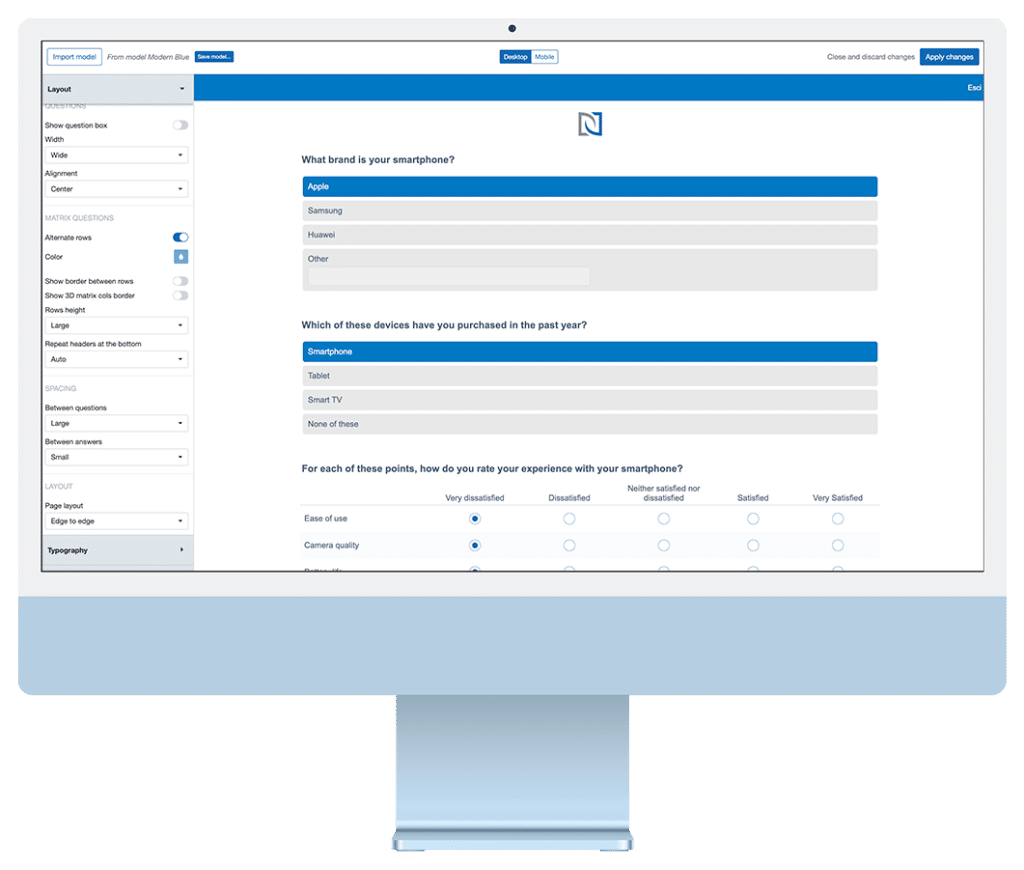
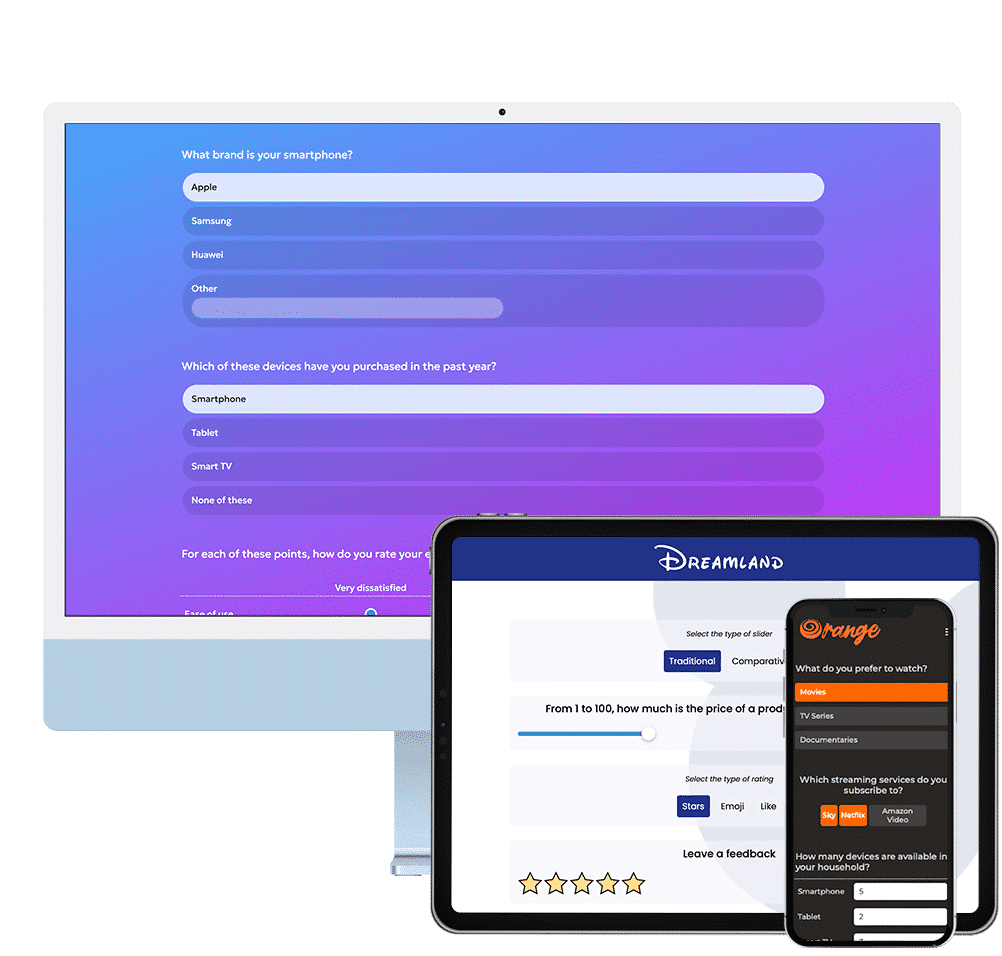
Deliver surveys that reflect your brand’s identity with precision and style. IdSurvey is an outstanding theming and branding tools that let you customize every visual element of your questionnaire—from colors, fonts, and logos to layout and navigation elements—ensuring a consistent and professional look across all touchpoints. Unlike many other platforms, IdSurvey offers detailed customization, allowing you to configure even the smallest aspects of your survey experience. You can define the overall layout style for question presentation, choosing between classic inputs like checkboxes and radio buttons, or a more modern button-based interface to enhance clarity and user experience. All themes are fully responsive, offering a seamless experience across desktops, tablets, and smartphones, so your brand always looks its best on any device.
Live preview
Preview your survey in real time before launching it. With IdSurvey’s live preview feature, you can easily switch between desktop and mobile views to ensure your questionnaire looks perfect on any device.
Ready to use templates
Jumpstart your online survey with a selection of professionally crafted templates. Perfectly balanced in style and usability, these ready-to-use themes can be applied as-is or used as a starting point for your own customizations.
Save new template
Create and store your own custom templates. Once saved, your branded themes and layout preferences can be easily used for future projects, no need to start from scratch every time.
Responsive themes
Ensure a seamless survey experience across all devices with fully responsive themes. Whether respondents access the survey from a smartphone, tablet, or desktop, with screen of any size, the layout automatically adapts to ensure optimal readability and engagement.
Custom CSS
For geek users IdSurvey offers full support for custom CSS. Perfect for agencies, designers, or brands with strict style guidelines, custom CSS lets you achieve a truly tailored and professional look.
Multi-language template support
Create a consistent brand experience across different languages. Templates automatically adapt to multilingual surveys, ensuring your design stays intact no matter the language your respondents see. One template, global reach.

Multi Mode
Mix multiple methodologies in the same survey
IdSurvey is not just an online survey software, it also natively supports CATI (telephone interviewing) and CAPI (face-to-face interviews with a dedicated offline app). Thanks to the Multi Mode feature, you can combine web surveys with telephone or face-to-face interviews. For example, to engage hard-to-reach targets such as doctors or politicians, you can begin by calling respondents to introduce the survey and generate interest, then send them a link to complete the questionnaire online at their convenience. In more challenging cases, you can assign an agent to conduct the interview in person. With Multi Mode, you bring together the advantages of phone, face-to-face, and online methodologies all in one powerful platform.
Testimonials






Online survey software FAQ
While other platforms focus on quick and basic surveys, IdSurvey is designed for professionals who take research seriously and require more than just standard features. Instead of offering oversimplified tools or rigid templates that restrict research potential, IdSurvey provides full control, advanced logic, multi-channel distribution, and professional-grade functionalities. The platform delivers capabilities that generalist tools simply cannot match. Discover the full comparison on the blog.
IdSurvey is designed to provide every researcher—whether conducting occasional surveys or managing large-scale projects—with full access to all professional features. There are no fixed plans, monthly fees, or limited-access versions. All functionalities are included by default, without restrictions or hidden costs.
The pricing model is based exclusively on completed interviews, with a per-interview cost that scales according to annual volume. This structure offers maximum flexibility and cost efficiency. A personalized quote can be requested at any time, with no obligation.
Yes. IdSurvey provides direct access to highly qualified and experienced technical specialists who offer assistance at every stage of the research process. Support requests are handled promptly via ticketing, and phone support is available when necessary for more direct communication.
Users interact directly with support technicians—no intermediaries—ensuring accurate and expert guidance. In addition to standard support, assistance is available for integrating third-party tools and developing custom features on request. From setup to advanced configurations, IdSurvey ensures that projects run smoothly and efficiently.
IdSurvey supports both cloud-based and on-premises deployment, depending on organizational needs. Regardless of the chosen deployment model, the product remains exactly the same: the same features, the same interface, and the same licensing structure. Users benefit from full access to all platform functionalities in both environments, ensuring a consistent experience and performance across solutions.
The cloud version provides immediate access to the platform, automatic updates, daily backups, and zero maintenance, making it ideal for teams seeking a fast and hassle-free setup.
For organizations with specific security policies or internal hosting requirements, IdSurvey can also be installed on local servers. This on-premises version offers full control over infrastructure and data management. Technical support is provided during installation and for any required configurations.
No. IdSurvey is designed to be user-friendly and accessible to users without technical backgrounds. The interface simplifies complex operations through step-by-step guidance and visual tools for building logic and workflows.
At the same time, the platform includes advanced capabilities for experienced users, such as API access on request, scripting, and integration with external systems. Whether managing a simple feedback form or a complex multilingual survey, IdSurvey adapts to the user’s level of expertise.
Additionally, training courses are available on request, providing structured learning paths to help teams make the most of the platform’s full potential.
Yes. IdSurvey is designed to support compliance with the General Data Protection Regulation (GDPR) and follows recognized standards for data security and privacy. Data are hosted in ISO-certified data centers and are protected with commonly adopted security protocols, including encryption during transmission.
IdSurvey is structured to support responsible data management practices and to help protect respondents’ privacy throughout the data lifecycle.
Absolutely. IdSurvey provides assistance throughout the entire survey creation process, including project setup, question design, logic configuration, and testing. Support is handled by experienced technicians who ensure optimal use of the platform’s capabilities.
Upon request, IdSurvey can also deliver a turnkey service, developing the entire questionnaire based on specific client needs. This option is ideal for organizations seeking a time-saving solution or requiring precise implementation of complex logic. From concept to deployment, IdSurvey ensures a fully customized, ready-to-use survey solution.
Knowledge base
Enter the knowledge base to discover all the solutions and strategies for setting up and designing questionnaires.
Guide and papers
IdSurvey has an online guide for all features of the software so you can easily discover all tools.
Help Desk support
Using your ticket area you can request technical assistance. One of our experts will answer you back shortly.