
When it comes to online surveys, content quality is essential—but visual design also plays a key role in engaging respondents and conveying professionalism. A well-designed questionnaire can boost trust, reduce drop-out rates, and make the completion experience smoother. That’s why IdSurvey provides an advanced theme editor, designed to offer maximum customization for your online surveys.
Difference between layout and styles
In the context of online questionnaires, layout and visual style are two distinct yet complementary elements.
Layout refers to the structural arrangement of components: the positioning of questions, spacing, alignment, and content flow.
Visual style, on the other hand, concerns the aesthetic appearance: colors, fonts, icons, borders, backgrounds, and all visual elements that define the questionnaire’s identity.
An effective layout ensures smooth and organized interaction, enhancing accessibility and providing a better experience across all devices. A well-crafted visual style, consistent with your brand identity, reinforces recognition and helps create a professional and pleasant experience for respondents.
When combined thoughtfully, both aspects can increase survey completion rates and improve the quality of collected data.
With IdSurvey’s theme editor, you can design questionnaires with a functional layout and a fully customized visual style—perfectly aligned with your goals and brand image.

A visual editor for full customization
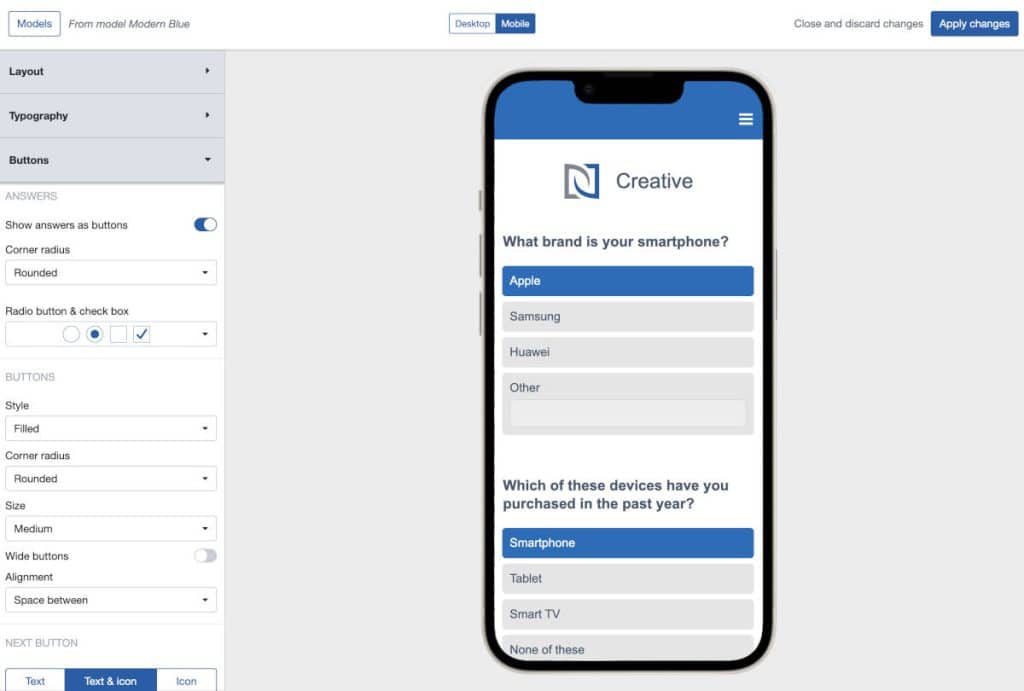
The built-in visual editor allows you to modify every layout element easily and intuitively.
No coding skills are required—you can manage the entire look and feel of your questionnaire through a user-friendly interface with real-time preview.
Key features include:
- A wide library of ready-to-use themes
- Customization of colors, fonts, and text sizes
- Custom styling for radio buttons and checkboxes
- Editing of margins and spacing between elements
- Control over element widths, sizes, and alignment
- Insertion of logos, images, and custom backgrounds
- Responsive preview to optimize layout on mobile devices
Every change is instantly displayed in the preview panel, allowing you to test and fine-tune both layout and styles seamlessly.
Reusable themes
Every customization can be saved as a new theme.
This allows you to:
- Reuse layout and design in new projects, saving time
- Maintain visual consistency across different surveys
- Build a collection of branded themes for multiple clients
Additionally, you can edit a theme already applied to a survey without affecting other surveys using the same template, giving you full flexibility in project management.
Flexibility for every type of survey and device
Whether you’re creating a customer satisfaction survey, a market research study, a product test, or an internal data collection form, the layout and style must adapt to the context.
The IdSurvey editor is designed to manage every visual element of your questionnaire—even on mobile devices. For example, you can choose to display questions as buttons to make selection easier for users on smartphones and tablets.
CSS and javascript for advanced users
For those with more technical needs, IdSurvey allows the inclusion of custom CSS and JavaScript code, offering full control over the layout’s behavior and style.
This option is ideal for developers, web designers, or research institutes looking to finely customize specific aspects of their survey layout and design.
Conclusion
The visual appearance of a questionnaire is much more than an aesthetic detail—it’s a strategic tool to increase engagement, improve the respondent experience, and strengthen your organization’s identity.
With IdSurvey’s theme editor, you have all the tools you need to design online surveys that are visually effective, functional, and high-performing.